
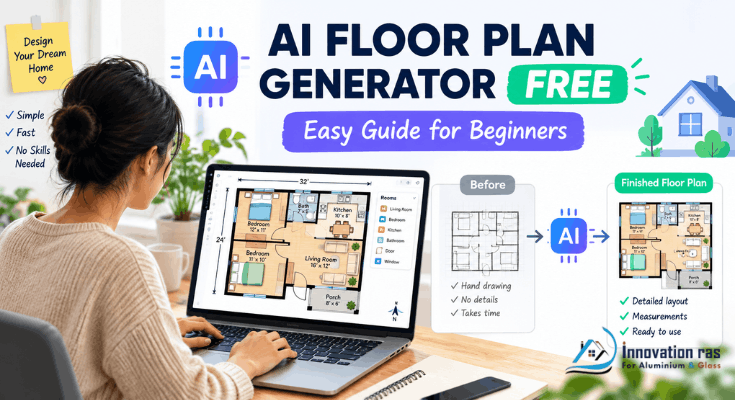
Want a professional room layout without hiring an architect? An AI floor plan generator free of charge can create one in minutes.
You type a few words. The tool then draws walls, doors, and rooms for you. No design degree or coding skills are required.
However, most beginners feel lost at first. Therefore, this guide explains everything in plain English. Whether you run a blog, a small shop, or a brand-new website, you can follow along.
By the end, you will know how an AI floor plan generator free tool works. You will also learn how to add your finished plan to a website without touching code.
What Is an AI Floor Plan Generator Free Tool?
An AI floor plan generator is software that creates room layouts automatically. It uses artificial intelligence to turn your input into a drawing.
Your input can be text, a sketch, or a photo. For example, you might type “two-bedroom apartment with open kitchen.”
The AI then produces a 2D floor plan with walls, windows, and measurements. Some tools also add a 3D view.
The word “free” matters here. A typical AI floor plan generator free plan offers basic features at no cost. Premium features often sit behind a paywall.
Still, free plans are usually enough for beginners. You can test ideas, share drafts, and learn without spending a dime.
Why Bloggers and Small Business Owners Need Floor Plans
Many people believe floor plans are only for architects. However, that is no longer true.
Here is how everyday website owners use them:
- Real estate bloggers show layouts beside listing photos.
- Airbnb hosts help guests picture the space before booking.
- Cafe and salon owners plan seating, stations, and walkways.
- Interior design bloggers illustrate room makeover ideas.
- Event venue managers display table and stage arrangements.
- Coworking founders map desks, meeting rooms, and quiet zones.
Moreover, visuals keep visitors on your page longer. Therefore, a clear layout can build trust and boost bookings.
As a result, an AI floor plan generator free of cost gives small teams a big advantage. You skip expensive software and long learning curves.
A Quick Real-World Example
Imagine Maria, who runs a small bakery blog. She wants to open a tiny cafe and show her readers the plan.
She types a short prompt into her tool. It describes a 600-square-foot cafe with a counter, eight seats, and a small kitchen.
Within minutes, she has a clean layout. Next, she moves the counter, adds a door, and exports the image.
Finally, she posts it on her website. Her readers comment, share, and even suggest improvements. In short, she got free design help and free content at once.
How an AI Floor Plan Generator Free Tool Works Behind the Scenes
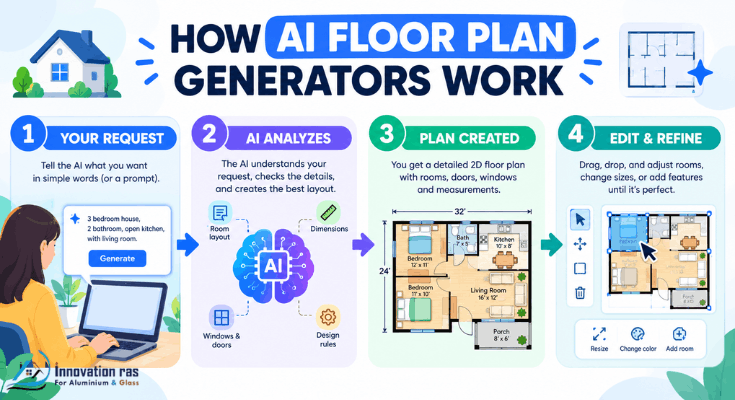
You do not need to understand the technology. Still, a simple picture helps.
First, the AI reads your request. It looks for room types, sizes, and preferences.
Next, it applies design rules learned from many example layouts. These rules cover door placement, room flow, and standard furniture sizes.
Then, it draws a plan and shows it on screen. Finally, you edit the result with simple drag-and-drop controls.
In other words, the AI does the heavy lifting while you guide it. For example, you can say “make the living room bigger.” Most tools update the plan instantly.
Because of this, any AI floor plan generator free user can produce a decent draft on day one.
Key Features to Look for in an AI Floor Plan Generator Free Option
Not every tool is equal. Therefore, check these features before you commit:
- Text-to-plan input: Type a description and receive a layout.
- Drag-and-drop editor: Adjust walls, doors, and windows with ease.
- Furniture library: Add beds, sofas, tables, and fixtures.
- Accurate measurements: Set room sizes in feet or meters.
- Export options: Download PNG, JPG, or PDF files.
- 3D preview: See the space from a visitor’s viewpoint.
- No watermark: Clean images look more professional.
- Commercial use rights: Confirm you can publish plans on business sites.
Additionally, look for a beginner-friendly interface. If the screen looks confusing, move on.
Note that limits vary by tool and change often. So, read the free plan details before you start.
Types of Free AI Floor Plan Tools
Free tools generally fall into four groups. Each suits a different need.
- Text-to-floor-plan generators: You type a prompt, and the AI builds a layout. This is the fastest route for beginners.
- Sketch-to-plan tools: You upload a hand drawing or photo. The AI converts it into a clean digital plan.
- Drag-and-drop planners with AI help: You place rooms yourself. The AI suggests improvements.
- Template-based design platforms: You start with a ready layout and customize it.
Well-known planners such as Planner 5D, Floorplanner, and RoomSketcher offer free tiers. Sweet Home 3D is free, open-source software. However, AI features and limits differ by tool and change over time. Therefore, verify details on each official site.
Overall, the best AI floor plan generator free choice for beginners is usually a text-to-plan tool. It needs the least learning time.
Step-by-Step: Create Your First Plan With an AI Floor Plan Generator Free Tool
Follow these seven steps. No experience is needed.
- Define your goal. Decide what the plan is for. A rental listing needs different details than a cafe.
- Measure your space. Note the total area and key dimensions. Even rough numbers help.
- Choose a tool. Pick an AI floor plan generator free plan that allows exports.
- Write a clear prompt. Include room count, sizes, and style.
- Review the first draft. Check the flow, doors, and walking paths.
- Edit and refine. Move walls, resize rooms, and add furniture.
- Export and save. Download a high-quality PNG or PDF.
Consequently, you can finish in under an hour. Many beginners finish in fifteen minutes.
How to Write Prompts That Get Better Results
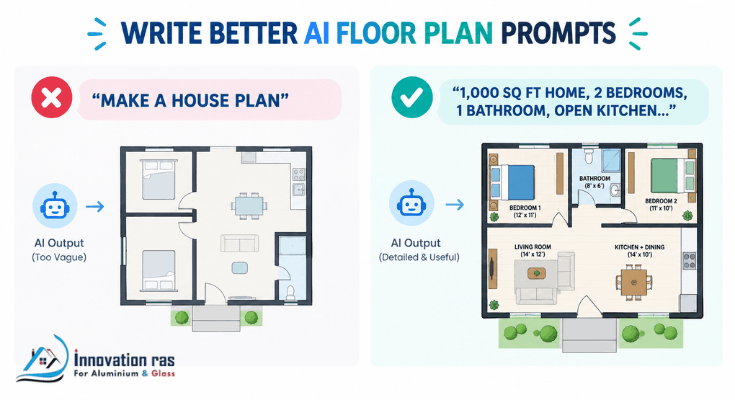
Your prompt shapes the result. Vague requests create vague plans.
Compare these two prompts:
- Weak: “Make a house plan.”
- Strong: “Create a 1,000 sq ft one-story home with two bedrooms, one bathroom, an open kitchen, and a small office.”
The strong version gives the AI clear limits. As a result, the layout is far more useful.
Try including these details:
- Total area in square feet or square meters
- Number of rooms and their purpose
- Special needs, such as wheelchair access
- Style, such as open-plan or traditional
- Fixed elements, such as stairs or plumbing walls
Additionally, run several versions. Every AI floor plan generator free tool can produce different options from small prompt changes.
Then compare the results and pick your favorite.
Limits of Free Plans You Should Know
Free is great. However, it comes with trade-offs.
- Watermarks may appear on exports.
- Low-resolution downloads may look blurry.
- Limited projects may cap how many plans you can save.
- Fewer AI credits may restrict daily generations.
- Commercial restrictions may block business use.
For example, a watermark can hurt a professional website. Therefore, check the license before publishing.
Also, remember that AI output is a starting point. It is not a certified architectural drawing. Always ask a licensed professional to review any plan before construction or permits.
Still, for marketing, planning, and brainstorming, an AI floor plan generator free of charge is plenty.
How to Add Your Floor Plan to Your Website Without Coding
Once your AI floor plan generator’s free layout is ready, adding it to a site is easy. You do not need any code.
Follow these simple steps:
- Export your plan as a PNG or JPG file.
- Compress the image with a free online tool to keep pages fast.
- Rename the file with a clear name, such as “two-bedroom-apartment-floor-plan.png.”
- Upload it to WordPress, Wix, Squarespace, or Shopify through the media library.
- Add alt text that describes the image.
- Place it inside a page, post, or listing with the visual editor.
For instance, alt text could read “open-plan cafe layout with 12 seats.” Notably, this helps search engines and visitors who use screen readers.
Moreover, pair each plan with a short description. Text and images together perform better than images alone.
Best Uses of an AI Floor Plan Generator Free Tool for Your Business
An AI floor plan generator free tool supports many business types. Consider these practical ideas:
- Real estate listings: Add layouts under each property photo.
- Rental pages: Show the differences between units clearly.
- Home staging blogs: Display before-and-after layouts.
- Restaurant booking pages: Show seating charts.
- Wedding and event pages: Present table setups.
- Renovation content: Compare current and proposed layouts.
- Lead magnets: Offer a free downloadable layout guide.
In addition, floor plans make great social media content. Share them on Pinterest, Instagram, and Facebook. In turn, they can drive fresh traffic back to your site.
Common Mistakes Beginners Make
Avoid these traps:
- Skipping measurements. Guessing leads to unrealistic layouts.
- Ignoring traffic flow. People need clear paths between rooms.
- Overcrowding furniture. Leave space to move.
- Forgetting accessibility. Doorways and halls should be wide enough.
- Trusting the first draft. Always review and refine.
- Ignoring licenses. Confirm commercial rights before publishing.
However, none of these mistakes are hard to fix. With practice, you will improve quickly.
In fact, every AI floor plan generator free tool rewards patience. The more you test, the better your plans become.
Pro Tips to Get More From Your AI Floor Plan Generator Free Account
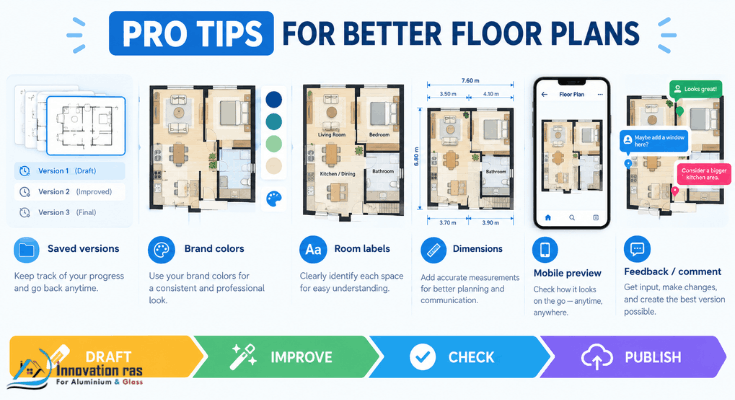
- Save versions. Keep a copy of each draft.
- Use consistent colors. Match your brand palette.
- Label rooms clearly. Visitors should understand the layout instantly.
- Add dimensions. Numbers build credibility.
- Test on mobile. Make sure text stays readable on small screens.
- Ask for feedback. Show drafts to friends or customers.
Furthermore, combine several tools. For instance, generate a layout in one tool and polish it in another.
Final Thoughts
Designing a layout no longer requires expensive software or years of training. Today, an AI floor plan generator free of cost puts that power in your hands.
To recap, choose a beginner-friendly tool. Write clear prompts, refine the draft, and check the license. Then upload the plan to your website with proper alt text.
Above all, start small. Try one room, one prompt, and one export today. An AI floor plan generator free tool is the easiest way to turn ideas into visuals your audience will love.
Frequently Asked Questions
Is there really an AI floor plan generator free to use?
Yes. Several platforms offer free tiers with basic AI features. However, limits such as watermarks or export caps often apply. Always read the plan details first.
Do I need design skills to use these tools?
No. Most tools are built for beginners. You describe your space in plain words, and the AI drafts the layout.
Can I use free floor plans on my business website?
It depends on the tool. Some free plans restrict commercial use. Therefore, check the license or terms before publishing.
How accurate are AI-generated floor plans?
They are good for planning and visuals. However, they are not legal or structural documents. A licensed professional should verify plans before building.
Can I turn a hand sketch into a digital plan?
Yes. Many tools accept photos or scans of sketches. The AI then cleans up the lines and adds measurements.
Will floor plans help my website SEO?
They can help indirectly. Useful visuals improve engagement, and descriptive alt text supports image search. Additionally, original graphics make your content more unique.
What is the best AI floor plan generator free for beginners?
Look for a text-to-plan tool with a simple editor and clear export options. Try two or three, compare results, and keep the one that feels easiest.
Can I create a 3D view for free?
Some tools include basic 3D previews on free plans. Others lock them behind paid tiers. Check each tool’s current features.
2 thoughts on “AI Floor Plan Generator Free for Beginners”