
You do not need a degree to explore the best AI tools for architecture design. You also do not need to write a single line of code.
Today, anyone can turn a rough idea into a floor plan or a stunning building render. Therefore, bloggers, small business owners, and first-time designers can now create professional-looking visuals in minutes.
This guide explains the best AI tools for architecture design in plain language. You will learn what each tool does, who it suits, and where it falls short.
However, picking a tool is only half the job. So we also cover how to choose wisely, avoid beginner mistakes, and use your designs on your website.
What Is AI in Architecture Design?
AI in architecture means software that learns from huge sets of images, plans, and data. It then helps you create new designs or improve existing ones.
For example, you can type “modern two-story house with a timber facade” and receive an image in seconds. Similarly, some tools draw floor plans from your room list.
Most tools fall into four groups:
- Concept image generators: Turn text prompts into building visuals.
- AI render tools: Convert sketches or 3D models into realistic images.
- Floor plan generators: Create layouts from lot size and room needs.
- Site and planning tools: Study sunlight, wind, noise, and land use.
Knowing these groups makes it easier to match the best AI tools for architecture design to your goals.
Why Beginners and Small Business Owners Should Care
Traditional design software has a steep learning curve. Programs like Revit or AutoCAD can take months to learn.
In contrast, AI tools use plain language and simple buttons. Consequently, you can test ideas quickly and cheaply.
Here are the main benefits:
- Speed: Draft ideas in minutes instead of days.
- Lower cost: Many tools offer free plans or trials.
- Creativity: Explore dozens of styles before you commit.
- Better communication: Show clients or readers exactly what you mean.
Moreover, bloggers can create original visuals for every post. Small business owners, such as home stagers, interior stylists, and builders, can impress clients faster.
How We Chose the Best AI Tools for Architecture Design
We judged each tool with clear, beginner-friendly criteria:
- Ease of use: Can a non-technical person start quickly?
- Output quality: Do the results look realistic and useful?
- Price: Is there a free tier, trial, or fair pricing?
- Flexibility: Does it fit different project types?
- Support: Are tutorials and community help available?
Please note that features and pricing change often. Therefore, check each official website before you commit.
10 Best AI Tools for Architecture Design in 2026

Below are ten popular options. Each one suits a slightly different need.
1. Midjourney: Best for Stunning Concept Images
Midjourney turns text prompts into artistic images. Designers use it to explore moods, materials, and building styles early on.
- Best for: Concept art, facade ideas, and moodboards.
- Skill level: Beginner, though good prompts take practice.
- Watch out: Images are not technical drawings, so you cannot build from them.
Even so, it remains a favorite source of inspiration.
2. Veras: Best for Rendering From a 3D Model
Veras is an AI render tool that works with design programs such as SketchUp, Revit, and Rhino. It turns a plain 3D view into a realistic image.
- Best for: People who already have a basic 3D model.
- Skill level: Intermediate.
- Watch out: You need a compatible host program first.
Therefore, it suits small firms more than total beginners.
3. Maket.ai: Best for Beginner Floor Plans
Maket.ai generates floor plan options from your lot size and room needs. You can compare several layouts quickly.
- Best for: Home buyers, builders, and bloggers exploring layouts.
- Skill level: Beginner.
- Watch out: Layouts still need review against local building codes.
In short, it is a friendly starting point for space planning.
4. Autodesk Forma: Best for Site Analysis
Autodesk Forma, formerly known as Spacemaker, helps teams study a site early in planning. It looks at factors like sunlight, wind, and noise.
- Best for: Small developers and design teams.
- Skill level: Advanced.
- Watch out: It is built for professionals, so beginners may feel lost.
However, it shows how powerful AI can be at the planning stage.
5. Finch: Best for Layout Optimization
Finch focuses on optimizing residential floor plans. It generates and compares layout options based on your rules.
- Best for: Apartment and housing projects.
- Skill level: Advanced.
- Watch out: It fits best inside a professional design workflow.
Consequently, it is better for firms than for hobbyists.
6. LookX: Best All-in-One Platform for Design Visuals
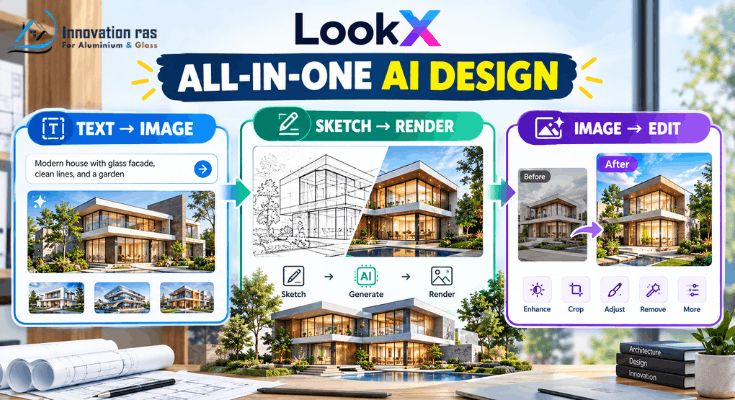
LookX combines text-to-image, sketch-to-render, and image editing in one place. It is built with architects and designers in mind.
- Best for: Anyone who wants several features under one login.
- Skill level: Beginner to intermediate.
- Watch out: Free limits may restrict heavy use.
As a result, you avoid juggling many separate apps.
7. Krea AI: Best for Live Sketch Rendering
Krea lets you draw or upload a sketch and watch the image update in real time. This makes experimenting feel like play.
- Best for: Quick idea testing and visual brainstorming.
- Skill level: Beginner.
- Watch out: Results vary, so expect some trial and error.
Meanwhile, the instant feedback helps you learn fast.
8. Planner 5D: Best for Home and Interior Layouts
Planner 5D is a drag-and-drop app for home and interior design. It offers a 3D view, and it includes AI-assisted features.
- Best for: Home stagers, interior stylists, and DIY planners.
- Skill level: Beginner.
- Watch out: Advanced architectural detail is limited.
Overall, it is one of the easiest ways to start.
9. ChatGPT and Claude: Best for Planning and Research
AI chat assistants help with the thinking side of design. You can draft project briefs, compare materials, and outline client emails.
- Best for: Research, writing, and planning steps.
- Skill level: Beginner.
- Watch out: Never rely on them alone for code or safety rules.
Furthermore, they can help you write the blog posts that showcase your work.
10. Canva: Best for Presenting Your Designs
Canva includes AI features that help you build presentation boards and social graphics. You can add text, layouts, and images without design skills.
- Best for: Bloggers and business owners sharing designs online.
- Skill level: Beginner.
- Watch out: It is a presentation tool, not a design tool.
Nevertheless, it completes your workflow nicely.
Quick Comparison Table
| Tool | Main Use | Difficulty |
| Midjourney | Concept images | Easy |
| Veras | Renders from 3D models | Medium |
| Maket.ai | Floor plans | Easy |
| Autodesk Forma | Site analysis | Advanced |
| Finch | Layout optimization | Advanced |
| LookX | All-in-one visuals | Easy to medium |
| Krea AI | Live sketch rendering | Easy |
| Planner 5D | Home and interior layouts | Easy |
| ChatGPT / Claude | Research and planning | Easy |
| Canva | Presentation boards | Easy |
How to Choose the Best AI Tools for Architecture Design for Your Goals

No single tool wins for everyone. Therefore, match the tool to your situation.
- Bloggers: Start with Midjourney, Krea AI, and Canva for eye-catching visuals.
- Small business owners: Try Planner 5D, Maket.ai, and Veras for client-ready ideas.
- Absolute beginners: Begin with Planner 5D and an AI chat assistant to learn the basics.
- Small design firms: Explore Autodesk Forma, Finch, and LookX for deeper workflows.
Additionally, start with free plans whenever possible. Test two or three tools before you pay for anything.
A Simple 5-Step Workflow for Beginners
Following a process keeps you from getting overwhelmed. Here is an easy one.
- Define your goal. Decide what you need, such as a blog image or a room layout.
- Generate concepts. Use an image tool to create several style options.
- Refine your favorite. Adjust the prompt, sketch, or layout until it feels right.
- Check with a professional. Ask a licensed architect to review anything you plan to build.
- Present your work. Add it to a board, a blog post, or a client proposal.
This routine works with almost all of the best AI tools for architecture design.
Tips for Writing Better Prompts
Your prompt shapes your result. For example, “nice house” gives vague images, while a detailed prompt gives focused ones.
Include these details:
- Style: Modern, rustic, minimalist, or Scandinavian.
- Materials: Timber, concrete, glass, or brick.
- Setting: Forest, beach, city street, or hillside.
- Lighting: Sunrise, golden hour, or soft overcast.
- Viewpoint: Aerial, street level, or interior.
Then experiment. Small wording changes can transform the outcome.
Common Mistakes Beginners Make
Avoid these traps to save time and money:
- Treating AI images as construction plans. They are inspiration, not legal drawings.
- Skipping local building codes. Rules vary by city and country.
- Ignoring license terms. Some tools limit commercial use.
- Paying too early. Free trials reveal what you truly need.
- Using too many tools. Master one or two first.
How to Use AI Architecture Visuals on Your Website Without Coding
You can build a website with no coding using platforms like WordPress, Wix, or Squarespace. Drag-and-drop editors make adding images simple.
However, a few habits will improve your results:
- Compress images. Smaller files make your pages load faster.
- Write clear alt text. It helps search engines and visually impaired visitors.
- Keep a consistent style. Matching colors and tones look more professional.
- Add short captions. They explain what each design shows.
- Be transparent. Label AI-generated images so visitors know how you made them.
For example, a blog post about the best AI tools for architecture design can include before-and-after images. This makes your content more useful and more shareable.
Limits, Ethics, and Legal Basics
AI is powerful, yet it has limits. Therefore, use it wisely.
- AI cannot replace a licensed architect. Professionals ensure safety, structure, and legal compliance.
- Copyright rules are still evolving. Read each tool’s terms before using images commercially.
- Privacy matters. Avoid uploading confidential client plans to public tools.
- Accuracy varies. AI can produce impossible structures or odd details.
In short, treat AI as a creative assistant. Do not treat it as a final authority.
Conclusion: Start Small and Build Confidence
AI has made design far more accessible. You can now sketch ideas, create renders, and plan layouts without technical training.
The best AI tools for architecture design help you work faster and communicate ideas clearly. Even so, they work best when paired with human judgment and professional advice.
Start with one or two tools from this list. Try a free plan, test a few prompts, and share your results. Soon, you will see why the best AI tools for architecture design are changing how everyday people create.
Frequently Asked Questions (FAQs)
What are the best AI tools for architecture design for beginners?
Midjourney, Planner 5D, Maket.ai, and Krea AI are great starting points. They use simple interfaces and require no coding. Beginners can also use ChatGPT or Claude to plan projects and learn terms.
Are the best AI tools for architecture design free?
Some offer free tiers or short trials, while advanced features usually cost money. Pricing changes often, so check each official site. Start with free options to test your needs.
Can AI replace architects?
No. AI speeds up brainstorming and visualization. However, architects handle safety, structure, regulations, and client needs that software cannot manage alone.
Can I build a house from AI-generated designs?
Not directly. AI images and plans are concept material. You still need professional drawings, engineering checks, and local permits.
Do I need coding skills to use these tools?
No. Most tools work through text prompts, sketches, or drag-and-drop menus. If you can type a sentence, you can begin.
Can I use AI architecture images on my blog or business website?
Often yes, but licenses differ by tool. Read the terms of use and consider labeling images as AI-generated. This builds trust with your audience.
How do I get better results from AI design tools?
Write detailed prompts that describe style, materials, lighting, and setting. Then refine your results step by step. Practice makes a big difference.
2 thoughts on “Best AI Tools for Architecture Design”